

As-Built Drawings for Home Renovation: Complete Guide to LiDAR 3D Scanning -2025
Planning a home renovation without accurate as-built drawings is one of the most costly mistakes homeowners make. Whether you're remodeling your kitchen, adding a second story, or converting your basement, professional construction documentation using LiDAR 3D scanning technology can save you thousands of dollars and weeks of delays.
This comprehensive guide explains what as-built drawings are, why they're essential for renovation projects, and how modern 3D laser scanning creates accurate existing conditions surveys that prevent construction surprises.
What Are As-Built Drawings? Definition and Key Components
As-built drawings (also called record drawings or existing conditions surveys) are precise technical documents showing your building's actual constructed conditions—not what was originally planned, but what physically exists today.
Essential Elements of As-Built Documentation
Professional as-built drawings include:
These drawings serve as the foundation for architects, engineers, and contractors to design and execute your renovation successfully without costly surprises.
Why Traditional Measuring Methods Create Renovation Problems
For decades, contractors used tape measures and laser distance meters for construction documentation. These manual methods have significant limitations that cause budget overruns:
Common Problems with Manual Measuring:
These limitations explain why 40% of renovation projects exceed their original budget due to undocumented existing conditions.
How LiDAR 3D Scanning Creates Accurate As-Built Drawings
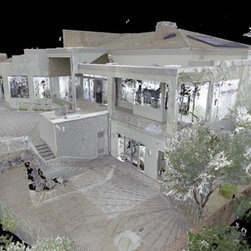
LiDAR scanning (Light Detection and Ranging) uses laser pulses to capture millions of precise measurements in minutes, creating a detailed point cloud—a three-dimensional digital model of your entire space.
The Professional LiDAR Scanning Process
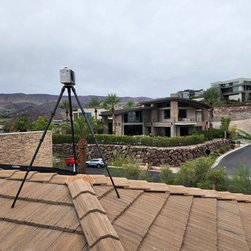
Step 1: On-Site 3D Laser Scanning A certified technician captures your entire home in a few hours using professional-grade LiDAR equipment.
Step 2: Point Cloud Processing Raw scan data creates a comprehensive 3D point cloud with 1-3 millimeter accuracy—roughly 1/16 inch precision.
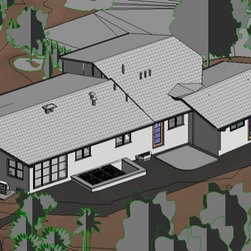
Step 3: CAD Drawing Creation Professional drafters convert the point cloud into industry-standard CAD drawings including floor plans, elevations, and cross-sections.
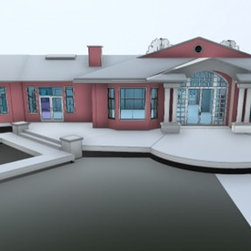
Step 4: Final Deliverables You receive construction-ready documentation: accurate floor plans, 3D models, and digital files compatible with all design software.
5 Critical Reasons You Need As-Built Drawings Before Home Renovation
1. Prevent Costly Construction Surprises and Hidden Problems
Without existing conditions surveys, contractors discover unexpected obstacles like plumbing, electrical wiring, structural beams, not on the original plans. These surprises typically add $5,000-$15,000 to renovation costs and cause 2-4 week delays.
LiDAR scanning reveals:
2. Get Accurate Project Budgeting and Contractor Bids
Contractors base their estimates on the plans you provide. Inaccurate measurements lead to change orders that increase costs by 15-30% on average. Professional construction documentation ensures competitive, accurate bids that protect your budget.
3. Enable Better Architectural Design Decisions
Architects need precise measurements to create functional, beautiful spaces that work with your home's actual conditions—not assumed dimensions. This is critical for:
4. Speed Up Building Permit Approvals
Most municipalities require accurate as-built drawings for permit applications, especially for structural modifications, additions, or historic properties. Professional documentation demonstrates proper planning and expedites inspector approval.
5. Create Long-Term Asset for Future Renovation Planning
As-built drawings become a valuable property asset for future projects, maintenance planning, insurance claims, and property sales. Update them after each renovation to maintain an accurate digital record.
Real-World Case Study: Historic Victorian Mansion Conversion
The Challenge: A developer purchased a 1890s Victorian mansion (8,500 sq ft) to convert into a boutique hotel with 12 guest suites in San Francisco. The building had undergone multiple modifications over 130 years, with no accurate existing plans. Original architectural drawings showed a completely different layout than what currently existed.
The Discovery Through LiDAR 3D Scanning: Comprehensive point cloud scanning revealed critical issues that would have derailed the $2.3M renovation:
The Result: Armed with millimeter-accurate as-built drawings, the architectural team completely redesigned the structural approach, preserved discovered historic features, and properly accounted for all existing systems. This prevented an estimated $180,000 in emergency structural corrections, avoided 8-12 weeks of construction delays, and enabled the developer to incorporate salvaged historic elements that increased property value.
The Investment: The comprehensive LiDAR scanning and documentation cost $4,200—less than 2.5% of the disaster costs avoided and 0.18% of the total project budget.
When You Need As-Built Drawings: Project Types and Scenarios
Professional existing conditions surveys are essential for:
Major Home Renovations
Structural Changes and Additions
Special Situations
Even smaller projects benefit from accurate measurements—preventing the common "it doesn't fit" problem that causes costly delays and material waste.
Point Cloud Technology: From 3D Scan to Perfect Floor Plans
Modern LiDAR technology creates a complete digital twin of your property. This point cloud data provides unprecedented capabilities:
This level of detail required weeks of manual surveying in the past. Now, 3D laser scanning delivers comprehensive construction documentation in days.
How to Get Professional As-Built Drawings: Step-by-Step Process
Finding the Right LiDAR Scanning Service
Step 1: Research Local Providers Search for "LiDAR scanning services near me" or "as-built drawings" plus your location. Look for companies specializing in residential existing conditions surveys with verified portfolios.
Step 2: Schedule Your 3D Scanning Appointment Most residential scans require 2-4 hours on-site. The technician will capture all spaces including basements, attics, and exterior measurements.
Step 3: Review Your Deliverables Within 7-10 business days, receive:
Step 4: Distribute to Your Project Team Share documentation with your architect, structural engineer, interior designer, and general contractor for accurate planning.
Investment and ROI
Professional as-built drawings typically cost $2,000-$5,000 depending on:
This investment prevents construction errors that cost 10-50 times more to fix after the fact.
Frequently Asked Questions About As-Built Drawings and LiDAR Scanning
Q: What's the difference between as-built drawings and construction drawings? A: As-built drawings document existing conditions—what currently exists. Construction drawings show new design intent for renovation work. You need accurate as-built drawings first to create realistic construction drawings.
Q: How accurate are LiDAR as-built drawings compared to manual measuring? A: LiDAR 3D scanning provides 1-3 millimeter accuracy (1/16 inch), while manual tape measuring typically has a couple inches of errors—or more in complex spaces. This precision difference prevents costly mistakes.
Q: How long does the LiDAR scanning process take from start to finish? A: On-site 3D laser scanning takes 2-4 hours. CAD drawing processing and creation typically requires 7-10 business days, with rush services available for time-sensitive projects.
Q: Can I use the same as-built drawings for multiple renovation projects? A: Absolutely. As-built drawings are a long-term property asset. Keep them updated after each renovation, and you'll have accurate documentation for future projects, maintenance, and property value assessments.
Q: Will contractors accept LiDAR-based as-built drawings? A: Yes. Professional contractors prefer working with accurate existing conditions surveys because they reduce risk and enable more competitive bidding. Most architects and engineers specifically request LiDAR documentation for complex projects.
Q: What file formats do I receive with professional as-built drawings? A: Standard deliverables include AutoCAD (DWG/DXF), PDF floor plans, 3D point cloud files (E57, RCP), and sometimes SketchUp or Revit models depending on your project needs.
Avoid These Common Renovation Mistakes: Start with Proper Documentation
Home renovation represents a major financial investment—often $50,000 to $200,000+ for comprehensive projects. Skipping professional existing conditions documentation is like building on quicksand.
The Real Cost of Missing As-Built Drawings
Projects without accurate as-built drawings experience:
The LiDAR Advantage for Modern Renovations
3D laser scanning technology makes professional construction documentation:
Whether you're planning a modest bathroom update or a whole-home transformation, starting with precise existing conditions surveys sets your renovation up for success.
Ready to Start Your Renovation the Right Way?
Professional as-built drawings using LiDAR 3D scanning protect your renovation investment from costly surprises, delays, and budget overruns. With millimeter-accurate construction documentation, your architects, designers, and contractors can plan and execute confidently.
Take the next step:
Don't let undocumented existing conditions derail your renovation dreams. Contact a professional LiDAR scanning service today and protect your investment with accurate existing conditions surveys—your future self will thank you.
Contact Information
📞 Request a Quote: [Contact Form]
🌐 Visit: lidarasbuiltdrawings.com
📍 Service Area: Las Vegas, Henderson, Paradise, and throughout Clark County, Nevada; plus Scottsdale and Phoenix, Arizona; Denver,Los Angeles, San Francisco,Utah, and Central Texas .
📧 Email: info@lidarpreciseplans.com
🕐 Response Time: 24 hours or less for all inquiries
Looking for professional as-built drawings for your home renovation? Visit lidarasbuiltdrawings.com for expert LiDAR 3D scanning services, accurate floor plans, and construction documentation that contractors trust.
This comprehensive guide explains what as-built drawings are, why they're essential for renovation projects, and how modern 3D laser scanning creates accurate existing conditions surveys that prevent construction surprises.
What Are As-Built Drawings? Definition and Key Components
As-built drawings (also called record drawings or existing conditions surveys) are precise technical documents showing your building's actual constructed conditions—not what was originally planned, but what physically exists today.
Essential Elements of As-Built Documentation
Professional as-built drawings include:
- Accurate floor plans with millimeter-precise measurements
- Wall locations and dimensions including thickness and materials
- Ceiling heights and structural elements such as beams and columns
- Door and window placements with exact dimensions
- Mechanical system layouts (HVAC, plumbing, electrical routing)
- Load-bearing walls and structural components
- Historical modifications and additions made over time
These drawings serve as the foundation for architects, engineers, and contractors to design and execute your renovation successfully without costly surprises.
Why Traditional Measuring Methods Create Renovation Problems
For decades, contractors used tape measures and laser distance meters for construction documentation. These manual methods have significant limitations that cause budget overruns:
Common Problems with Manual Measuring:
- Human error in complex spaces with angles and hard-to-reach areas
- Time-intensive process requiring multiple site visits
- Incomplete vertical data missing ceiling details and structural elements
- No visual reference for spatial relationships
- Accuracy issues with potential errors of several inches
These limitations explain why 40% of renovation projects exceed their original budget due to undocumented existing conditions.
How LiDAR 3D Scanning Creates Accurate As-Built Drawings
LiDAR scanning (Light Detection and Ranging) uses laser pulses to capture millions of precise measurements in minutes, creating a detailed point cloud—a three-dimensional digital model of your entire space.
The Professional LiDAR Scanning Process
Step 1: On-Site 3D Laser Scanning A certified technician captures your entire home in a few hours using professional-grade LiDAR equipment.
Step 2: Point Cloud Processing Raw scan data creates a comprehensive 3D point cloud with 1-3 millimeter accuracy—roughly 1/16 inch precision.
Step 3: CAD Drawing Creation Professional drafters convert the point cloud into industry-standard CAD drawings including floor plans, elevations, and cross-sections.
Step 4: Final Deliverables You receive construction-ready documentation: accurate floor plans, 3D models, and digital files compatible with all design software.
5 Critical Reasons You Need As-Built Drawings Before Home Renovation
1. Prevent Costly Construction Surprises and Hidden Problems
Without existing conditions surveys, contractors discover unexpected obstacles like plumbing, electrical wiring, structural beams, not on the original plans. These surprises typically add $5,000-$15,000 to renovation costs and cause 2-4 week delays.
LiDAR scanning reveals:
- Structural modifications from previous renovations
- Non-standard construction details
- Potential code violations requiring correction
2. Get Accurate Project Budgeting and Contractor Bids
Contractors base their estimates on the plans you provide. Inaccurate measurements lead to change orders that increase costs by 15-30% on average. Professional construction documentation ensures competitive, accurate bids that protect your budget.
3. Enable Better Architectural Design Decisions
Architects need precise measurements to create functional, beautiful spaces that work with your home's actual conditions—not assumed dimensions. This is critical for:
- Older homes where original plans don't exist or are outdated
- Custom millwork requiring exact measurements for cabinets and built-ins
- Structural analysis determining which walls can be safely removed
- Space planning optimizing room layouts and traffic flow
4. Speed Up Building Permit Approvals
Most municipalities require accurate as-built drawings for permit applications, especially for structural modifications, additions, or historic properties. Professional documentation demonstrates proper planning and expedites inspector approval.
5. Create Long-Term Asset for Future Renovation Planning
As-built drawings become a valuable property asset for future projects, maintenance planning, insurance claims, and property sales. Update them after each renovation to maintain an accurate digital record.
Real-World Case Study: Historic Victorian Mansion Conversion
The Challenge: A developer purchased a 1890s Victorian mansion (8,500 sq ft) to convert into a boutique hotel with 12 guest suites in San Francisco. The building had undergone multiple modifications over 130 years, with no accurate existing plans. Original architectural drawings showed a completely different layout than what currently existed.
The Discovery Through LiDAR 3D Scanning: Comprehensive point cloud scanning revealed critical issues that would have derailed the $2.3M renovation:
- Three load-bearing walls had been removed in the 1960s and replaced with inadequate support beams
- The third-floor addition from 1925 wasn't shown on any existing documentation
- Previous renovations had created a maze of concealed plumbing and electrical systems
- Original ornamental plaster ceilings were hidden behind dropped acoustical tiles
- The basement foundation had unexpected structural reinforcements from an undocumented earthquake retrofit
The Result: Armed with millimeter-accurate as-built drawings, the architectural team completely redesigned the structural approach, preserved discovered historic features, and properly accounted for all existing systems. This prevented an estimated $180,000 in emergency structural corrections, avoided 8-12 weeks of construction delays, and enabled the developer to incorporate salvaged historic elements that increased property value.
The Investment: The comprehensive LiDAR scanning and documentation cost $4,200—less than 2.5% of the disaster costs avoided and 0.18% of the total project budget.
When You Need As-Built Drawings: Project Types and Scenarios
Professional existing conditions surveys are essential for:
Major Home Renovations
- Kitchen remodels removing walls or relocating plumbing
- Bathroom additions requiring structural modifications
- Master suite expansions with new plumbing and electrical
- Open-concept conversions removing load-bearing walls
Structural Changes and Additions
- Second-story additions requiring foundation analysis
- Basement conversions with ceiling height verification
- Garage conversions integrating with existing structures
- Roof modifications and dormer additions
Special Situations
- Historic home restoration where original drawings are unavailable or inaccurate
- Commercial property updates for retail, office, or multi-family buildings
- Pre-purchase documentation for serious buyers evaluating renovation potential
- Insurance claims documenting existing conditions before and after damage
Even smaller projects benefit from accurate measurements—preventing the common "it doesn't fit" problem that causes costly delays and material waste.
Point Cloud Technology: From 3D Scan to Perfect Floor Plans
Modern LiDAR technology creates a complete digital twin of your property. This point cloud data provides unprecedented capabilities:
- View from any angle for comprehensive spatial understanding
- Digital measurements eliminating need for return site visits
- Team collaboration sharing accurate data with all project stakeholders
- Design integration allowing architects to work directly from scan data
- Virtual walkthroughs visualizing projects before construction begins
This level of detail required weeks of manual surveying in the past. Now, 3D laser scanning delivers comprehensive construction documentation in days.
How to Get Professional As-Built Drawings: Step-by-Step Process
Finding the Right LiDAR Scanning Service
Step 1: Research Local Providers Search for "LiDAR scanning services near me" or "as-built drawings" plus your location. Look for companies specializing in residential existing conditions surveys with verified portfolios.
Step 2: Schedule Your 3D Scanning Appointment Most residential scans require 2-4 hours on-site. The technician will capture all spaces including basements, attics, and exterior measurements.
Step 3: Review Your Deliverables Within 7-10 business days, receive:
- Professional CAD floor plans (AutoCAD format)
- Building elevations and cross-sections
- 3D point cloud files
- PDF documentation for contractors
- Digital measurements report
Step 4: Distribute to Your Project Team Share documentation with your architect, structural engineer, interior designer, and general contractor for accurate planning.
Investment and ROI
Professional as-built drawings typically cost $2,000-$5,000 depending on:
- Home square footage
- Complexity of spaces (multiple levels, unusual layouts)
- Turnaround time requirements
- Level of detail needed
- Additional deliverables requested
This investment prevents construction errors that cost 10-50 times more to fix after the fact.
Frequently Asked Questions About As-Built Drawings and LiDAR Scanning
Q: What's the difference between as-built drawings and construction drawings? A: As-built drawings document existing conditions—what currently exists. Construction drawings show new design intent for renovation work. You need accurate as-built drawings first to create realistic construction drawings.
Q: How accurate are LiDAR as-built drawings compared to manual measuring? A: LiDAR 3D scanning provides 1-3 millimeter accuracy (1/16 inch), while manual tape measuring typically has a couple inches of errors—or more in complex spaces. This precision difference prevents costly mistakes.
Q: How long does the LiDAR scanning process take from start to finish? A: On-site 3D laser scanning takes 2-4 hours. CAD drawing processing and creation typically requires 7-10 business days, with rush services available for time-sensitive projects.
Q: Can I use the same as-built drawings for multiple renovation projects? A: Absolutely. As-built drawings are a long-term property asset. Keep them updated after each renovation, and you'll have accurate documentation for future projects, maintenance, and property value assessments.
Q: Will contractors accept LiDAR-based as-built drawings? A: Yes. Professional contractors prefer working with accurate existing conditions surveys because they reduce risk and enable more competitive bidding. Most architects and engineers specifically request LiDAR documentation for complex projects.
Q: What file formats do I receive with professional as-built drawings? A: Standard deliverables include AutoCAD (DWG/DXF), PDF floor plans, 3D point cloud files (E57, RCP), and sometimes SketchUp or Revit models depending on your project needs.
Avoid These Common Renovation Mistakes: Start with Proper Documentation
Home renovation represents a major financial investment—often $50,000 to $200,000+ for comprehensive projects. Skipping professional existing conditions documentation is like building on quicksand.
The Real Cost of Missing As-Built Drawings
Projects without accurate as-built drawings experience:
- 25-35% higher costs from change orders and corrections
- 3-6 week delays discovering and fixing hidden problems
- Design compromises because actual conditions differ from assumptions
- Permit rejections requiring plan revisions and resubmission
- Contractor disputes about scope and responsibility for surprises
The LiDAR Advantage for Modern Renovations
3D laser scanning technology makes professional construction documentation:
- Faster than traditional surveying methods
- More accurate by orders of magnitude
- More affordable with declining equipment costs
- More comprehensive capturing every detail in one visit
- More useful providing digital files for entire project team
Whether you're planning a modest bathroom update or a whole-home transformation, starting with precise existing conditions surveys sets your renovation up for success.
Ready to Start Your Renovation the Right Way?
Professional as-built drawings using LiDAR 3D scanning protect your renovation investment from costly surprises, delays, and budget overruns. With millimeter-accurate construction documentation, your architects, designers, and contractors can plan and execute confidently.
Take the next step:
- Get a free consultation to discuss your renovation project
- Schedule your LiDAR scanning appointment
- Receive accurate as-built drawings in 7-10 business days
- Start your renovation with confidence and accurate information
Don't let undocumented existing conditions derail your renovation dreams. Contact a professional LiDAR scanning service today and protect your investment with accurate existing conditions surveys—your future self will thank you.
Contact Information
📞 Request a Quote: [Contact Form]
🌐 Visit: lidarasbuiltdrawings.com
📍 Service Area: Las Vegas, Henderson, Paradise, and throughout Clark County, Nevada; plus Scottsdale and Phoenix, Arizona; Denver,Los Angeles, San Francisco,Utah, and Central Texas .
📧 Email: info@lidarpreciseplans.com
🕐 Response Time: 24 hours or less for all inquiries
Looking for professional as-built drawings for your home renovation? Visit lidarasbuiltdrawings.com for expert LiDAR 3D scanning services, accurate floor plans, and construction documentation that contractors trust.